
Look at the lens, not the faces on your screen, and slightly amplify your facial expressions. That single adjustment addresses two biggest problems in virtual meetings: nonverbal overload that drives Zoom fatigue, documented in a 2023 study of nearly 10,000 participants, and the fact that facial expressions carry more weight than gestures in virtual settings, according to research published in Scientific Reports. Get this one thing right and viewers read you as present and trustworthy instead of distracted or flat.
TL;DR:
- Amplifying facial expressions to a slightly higher intensity than in person helps convey engagement and trust without appearing performative.
- Positioning the camera at eye level and keeping gestures within the collarbone to chin range enhances clarity and prevents disjointed movements.
- Hiding self-view during calls reduces Zoom fatigue driven by nonverbal overload, especially for women who report higher levels of fatigue.
- Practicing a five-minute routine that adjusts facial expressions, pacing, and gestures before important calls significantly improves on-camera presence.
- Seeking professional media coaching accelerates high-stakes presentation skills more effectively than self-practice alone.
Table of Contents
- What On-Camera Body Language Actually Requires
- Posture, Gestures, and Making the Most of Your Frame
- Getting Your Setup Right So Your Body Language Reads Clearly
- Common On-Camera Mistakes and Immediate Fixes
- Practice Routines That Build On-Camera Presence Fast
- Why Media Training Speeds Up What Self-Practice Can’t
- Reading the Room Through Body Language on a Screen
- Matching Your Body Language to Your Message
- Why Small Camera Habits Build Outsized Credibility
- Get Professional Coaching for High-Stakes Camera Appearances
- Key Research and Practical Resources
- Sources
- FAQ
What On-Camera Body Language Actually Requires
Most advice about on-camera body language focuses on posture tips or hand placement, but the research points somewhere else first: your face and your eyes. A camera compresses everything. It flattens depth, shrinks your gestures into a small rectangle, and strips out the subtle cues people usually read from a few feet away. What survives that compression is mostly your face and voice, which is why the Scientific Reports study found facial expressions had a stronger effect on interpersonal outcomes than body movements in avatar-mediated virtual environments, with machine-learning classifiers predicting attraction from nonverbal cues at roughly 65% accuracy.
That doesn’t mean your posture and gestures don’t matter. It means facial and vocal cues carry the largest share of the signal, so they deserve the most deliberate attention.
Why amplification works and how much is too much
People naturally compensate for lost cues in video-mediated conversation. Research comparing video and face-to-face communication found speakers tend to smile more broadly and talk louder on camera than they would in person, and that compensation reads as warmth rather than exaggeration. The trick is degree. A smile that feels like a 6 out of 10 in person usually reads as a 4 on camera, so pushing it to a 7 or 8 in the moment typically lands as normal and engaged, not performative.
The same logic applies to eyebrows and head tilts. Small, static faces read as bored or checked out on a screen. Movement is what signals attention.
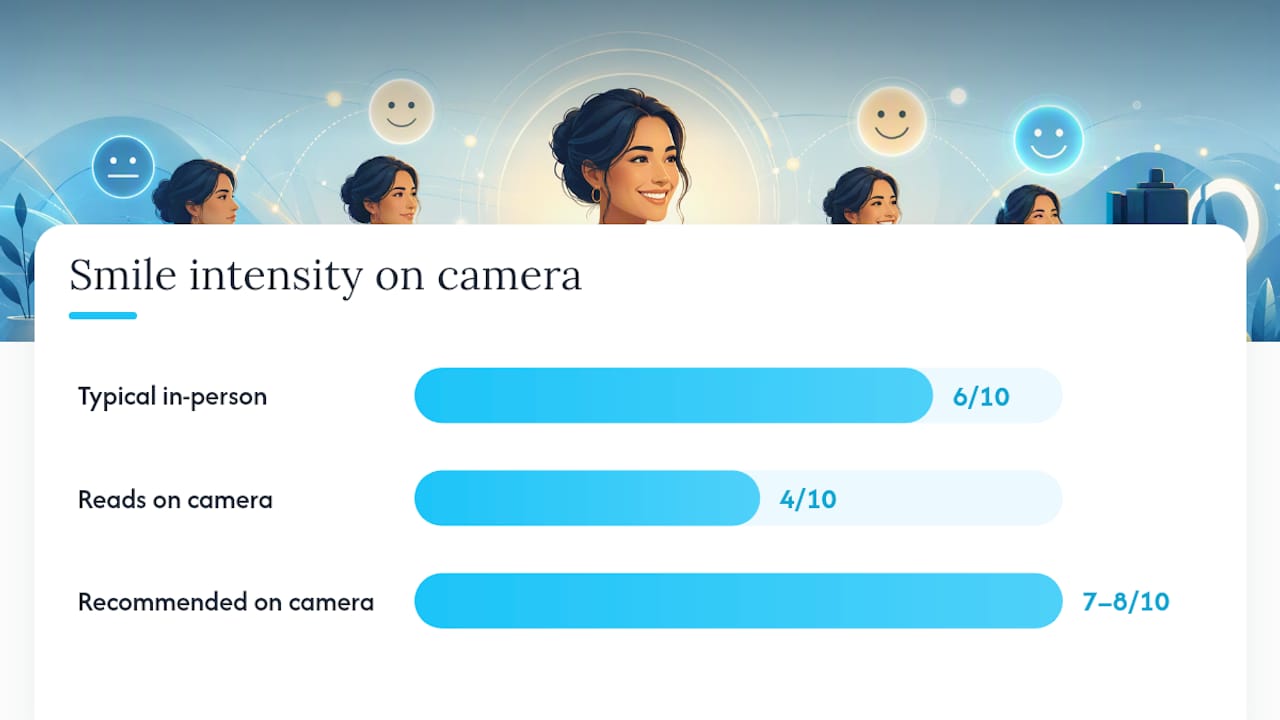
Statistic Callout: Nonverbal overload, including mirror anxiety and the effort of monitoring your own face, is a documented driver of video-call fatigue among the 9,787 participants studied by Stanford researchers, with women reporting notably higher fatigue levels. That’s a strong argument for hiding your self-view once you’ve confirmed your framing.
Vocal delivery works alongside facial cues, not separately from them. A flat voice cancels out an animated face, and vice versa. Three habits make the biggest difference:
- Slow your pace by roughly 10 to 15% compared to in-person speech, since audio compression and slight lag make fast speech harder to parse.
- Project slightly more than feels natural. Screens and laptop microphones swallow vocal energy the way cameras swallow facial expression.
- Use deliberate pauses before key points. A one-second pause paired with direct lens contact reads as confidence, not hesitation.
A few rehearsal habits build this quickly. Read a paragraph of a script out loud while looking directly at the lens, not the preview window, for 60 seconds at a stretch. Record it. Then do a second take where you consciously widen your expression range and slow down by a beat. Comparing the two clips side by side usually makes the difference obvious in a way no amount of theoretical advice can.
Posture, Gestures, and Making the Most of Your Frame
Your upper body has to do more work in a small frame, which means the setup matters as much as the movement itself. Frame yourself from mid-chest up with a little headroom, so your hands are visible when you raise them to shoulder height. Cut off at the neck or shoulders, as many default laptop-camera setups do, and every gesture disappears off-screen, which reads as disembodied and slightly awkward.
Practitioners call the usable zone the “deliberate gesture space”: a plane roughly between your collarbone and chin, kept inside the lower third of the frame. Gestures that dip below the visible frame or dart in and out of it look chaotic rather than intentional, since viewers only register the part of a movement that stays on screen. A single open-palm gesture held for a full beat communicates more than three quick hand flicks.
Posture changes read as clearly as gestures do. Here’s the sequence that works:
- Sit forward slightly, with your spine long and your chest open rather than collapsed toward the desk.
- Drop your shoulders away from your ears. Tension there transmits as stiffness on camera even when your face looks relaxed.
- Lean in by two or three inches when making a key point, then return to neutral. That small shift mimics the forward lean people use in person to signal engagement.
- Keep both feet flat on the floor. It sounds irrelevant to what’s visible, but a stable base reduces the fidgeting that shows up as leg bouncing or chair swiveling.
Fidgeting is usually a release valve for nervous energy, so the fix isn’t willpower, it’s substitution. Hold a pen, place your hands loosely on the desk edge, or press your feet into the floor before a call starts. Give the nervous energy somewhere to go that isn’t visible.
Pro Tip: Do a 30-second “gesture check” before any important call: raise both hands to where you’d naturally gesture, and confirm they’re fully inside the frame. Adjusting your camera distance now saves you from looking chopped off later.
Getting Your Setup Right So Your Body Language Reads Clearly
None of the facial or gesture work matters if your setup undercuts it. A poorly placed camera or bad lighting can make even skilled nonverbal communication tips look worse than they are.
Camera height comes first. Position the lens at eye level or very slightly above it. A camera angled up your chin or nose makes you look disengaged or, worse, condescending, regardless of your actual expression. Stacking books or textbooks under a laptop, or using a $20 monitor riser, solves this for most home setups.
Lighting shapes how readable your facial expressions are, which matters directly given how much weight faces carry in virtual communication. A few fixes cover most situations:
- Put your main light source in front of you and slightly above eye level, not behind you or overhead, to avoid raccoon-eye shadows.
- Face a window if you have one. Natural light diffused through a curtain is often better than any ring light.
- Avoid strong backlighting from a window or lamp behind you. It silhouettes your face and erases exactly the expressions you’re trying to amplify.
Background and wardrobe choices affect how much visual noise competes with your face. Solid, muted colors read cleanly on camera; tight stripes, small checks, and busy patterns can create a shimmering distortion called moiré, especially on lower-resolution webcams. Keep your background tidy and uncluttered so viewers’ eyes land on your face rather than wandering the room behind you.
Audio and bandwidth deserve a mention too, since audio lag or muffled sound changes how viewers interpret facial and vocal cues, often reading engaged speakers as distracted. A $30 USB microphone usually outperforms a laptop’s built-in mic by a wide margin.
Common On-Camera Mistakes and Immediate Fixes
Most on-camera problems repeat across professionals, and most have a one-step fix you can apply on your very next call.
- Mirror anxiety. Watching your own video feed pulls attention inward and adds cognitive load tied to video fatigue. Fix: hide your self-view once you’ve confirmed your framing at the start of the call.
- Hyper-gaze. Staring unblinking at the lens to “seem engaged” actually looks unsettling on playback. Fix: blink and glance briefly at your notes, then return to the lens, the way natural conversation flows.
- Looking below the camera. Reading notes or a second monitor makes you appear to be looking down or away, which reads as disengaged or distracted. Fix: place notes directly beneath your webcam, not on a side monitor.
- Off-frame gestures. Hands that move in and out of the visible frame look erratic rather than expressive. Fix: keep gestures inside the deliberate gesture space described earlier, closer to your chin and chest.
- Slouching under fatigue. Posture degrades noticeably after 20 to 30 minutes on a call. Fix: set a silent phone reminder at the halfway mark to reset your spine and shoulders.
- Distracting backgrounds. Movement, clutter, or bright colors behind you compete with your face for attention. Fix: do a 5 second background scan before every call, not just the first one of the day.
A simple script cue helps lock these fixes in: when you say your key sentence, look directly at the lens and hold that gaze for one full breath before moving on. That single beat is often the difference between a point that lands and one that gets lost in the shuffle of a busy call.
Practice Routines That Build On-Camera Presence Fast
Improving on-camera body language responds well to short, structured practice, not hours of vague rehearsal. A tight feedback loop works faster than winging it on live calls.
- Run a 5-minute warm-up before important calls. Spend 90 seconds on posture (sit forward, drop shoulders), 90 seconds on facial loosening (exaggerated smiles, raised eyebrows, a few silent laughs), and 2 minutes reading a paragraph aloud at slightly slower pace with more vocal projection than feels natural.
- Record one minute, then review for two. A short recording-and-review loop produces faster improvement than unguided practice. Watch for lens contact, gesture containment, and whether your facial expression matches your message’s energy.
- Rehearse with a colleague once a week. A peer watching live can flag habits you can’t see in a recording, like a tendency to drift toward hyper-gaze under pressure.
- Keep a running checklist you glance at before high-stakes calls, not during them.
| Checklist item | What to check | Quick fix if off |
|---|---|---|
| Camera height | Lens at eye level or slightly above | Raise laptop with books or a stand |
| Framing | Chest up, hands visible when raised | Move chair back 6 inches |
| Lighting | Light source in front, not behind | Reposition lamp or face a window |
| Eye contact | Looking at lens, not the screen | Tape a small dot near the lens as a focal cue |
| Gesture space | Hands stay inside frame | Practice the 30 second gesture check |
| Self-view | Hidden after framing is set | Toggle off in your video platform’s settings |
Why Media Training Speeds Up What Self-Practice Can’t
A structured media-training session typically covers camera presence, message discipline, and live interview simulation, compressing months of trial and error into a few focused hours. A leading media training firm built its coaching around decades of combined experience from former television and radio producers and journalists who know exactly what makes a subject look credible under studio lights or on a live video call.
That perspective matters most for people whose next media appearance carries real stakes: executives, attorneys, spokespeople, and psychologists preparing for TV, radio, or a high-visibility virtual deposition or panel. Self-practice using the routines above closes most of the gap for everyday video calls. When the audience is a journalist, a jury of public opinion, or a national broadcast, an outside coach catches blind spots that self-recording alone rarely reveals.
- DIY practice fits internal meetings and routine client calls.
- Professional coaching fits media appearances, depositions, and high-stakes pitches where one bad impression sticks.
Reading the Room Through Body Language on a Screen
Interpreting audience feedback through body language cues gets harder on video, but it’s not impossible if you know where to look. In person, you’d scan a whole room for shifting posture or crossed arms. On a grid of small video tiles, the signals shrink to a few reliable indicators.
Watch for lean. A viewer leaning slightly toward their camera usually signals engagement, while someone leaning back or resting their chin on a hand often signals fatigue or distraction. Eye direction matters too. Frequent glances away from the screen, especially downward toward a phone, is one of the more obvious disengagement cues you can catch in a live call.
Facial mirroring offers another clue. Research on live video interaction found that mimicry between speakers in live video calls closely resembles mimicry in face-to-face conversation, unlike prerecorded video, where that synchrony breaks down. If your audience is nodding, smiling back, or subtly mirroring your posture in real time, you’re likely landing your message. A wall of still, expressionless faces usually means it’s time to change tack, ask a direct question, or shorten your point.
Silence reads differently on video than in a room. A pause that would feel natural in person can feel like dead air on a call, so pair any pause with a quick visual check of faces on the grid rather than assuming the silence means agreement.
Matching Your Body Language to Your Message
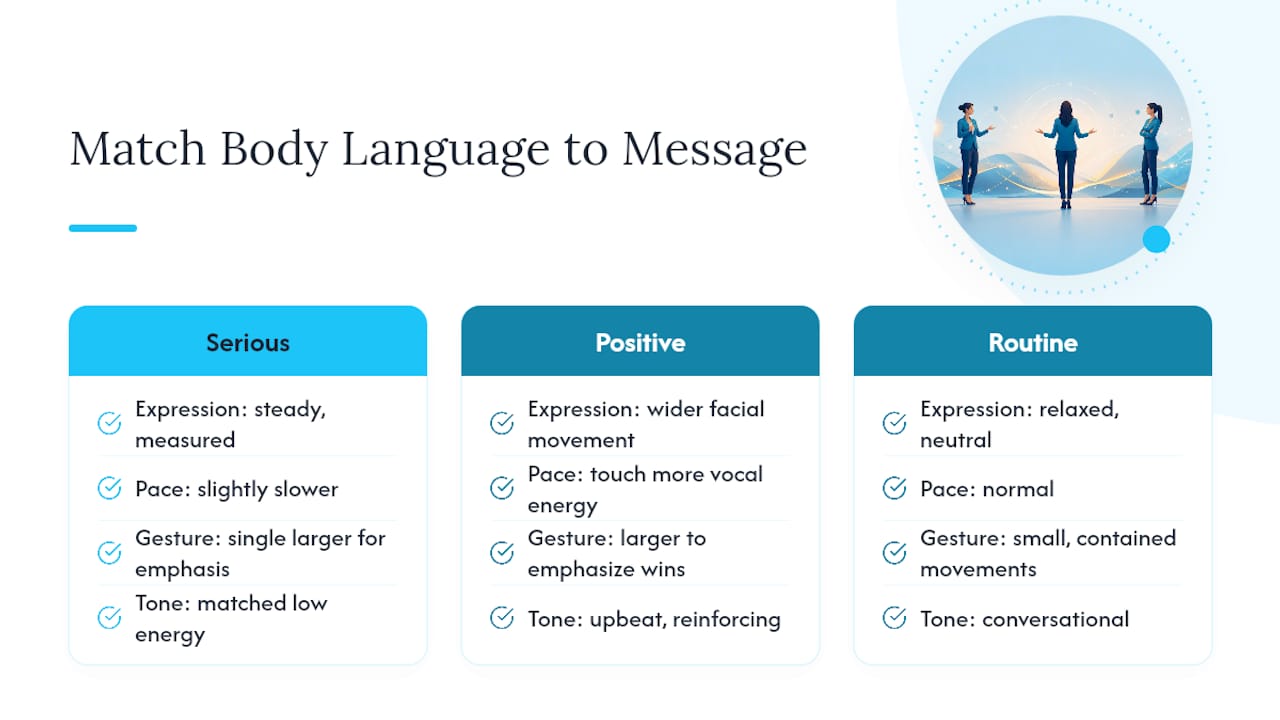
Nonverbal signals need to match what you’re actually saying, or viewers pick up on the mismatch faster than you’d expect. A serious announcement delivered with a bright, bouncy smile confuses people. So does a routine status update delivered with a tense, unsmiling face that suggests bad news is coming.
Calibrate expression to content before the call starts, not during it. If you’re delivering a difficult update, a steady, measured expression paired with a slightly slower pace signals seriousness without looking cold. If you’re pitching an idea or celebrating a win, wider facial movement and a touch more vocal energy reinforce the good news rather than undercutting it.
Gesture size should scale with the stakes of the point you’re making. Small, contained hand movements suit routine information. A single larger gesture, like an open palm moving outward, works well for emphasizing a genuinely important point, but only if you don’t repeat it for every sentence. Overusing big gestures flattens their impact the same way over-enunciating every word does.
Tone of voice ties it together. A message about budget cuts delivered in an upbeat, sales-pitch cadence reads as tone-deaf even if the words are appropriately serious. Matching vocal energy, facial expression, and gesture size to the actual weight of your content is what makes viewers trust that you mean what you’re saying.
Why Small Camera Habits Build Outsized Credibility
Anonymized coaching sessions tend to surface the same pattern: a client fixes eye contact and facial animation, and colleagues start describing them as more confident within weeks, without anything else about their message changing. Facial cues and lens contact do more of the credibility work than people assume, while gestures and posture provide backup support.
If you take one thing from this guide, make it the opening instruction: look at the lens, not the faces on your screen, and let your expression run slightly bigger than feels natural. Everything else, posture, framing, lighting, is in service of that one habit landing clearly. Try the five-minute warm-up before your next important call and see how much of a difference eye contact and facial energy make on their own.
— Ryan McCormick
Get Professional Coaching for High-Stakes Camera Appearances
Self-practice closes most of the gap for routine video calls, but when the stakes are a network interview, a courtroom-adjacent media moment, or a national broadcast, a former producer catching your blind spots in real time works faster than any solo drill. The coaching is shaped by a background of former television and radio producers and journalists, focusing on real camera time, real interview simulation, and message refinement from people experienced in what makes a guest look credible.
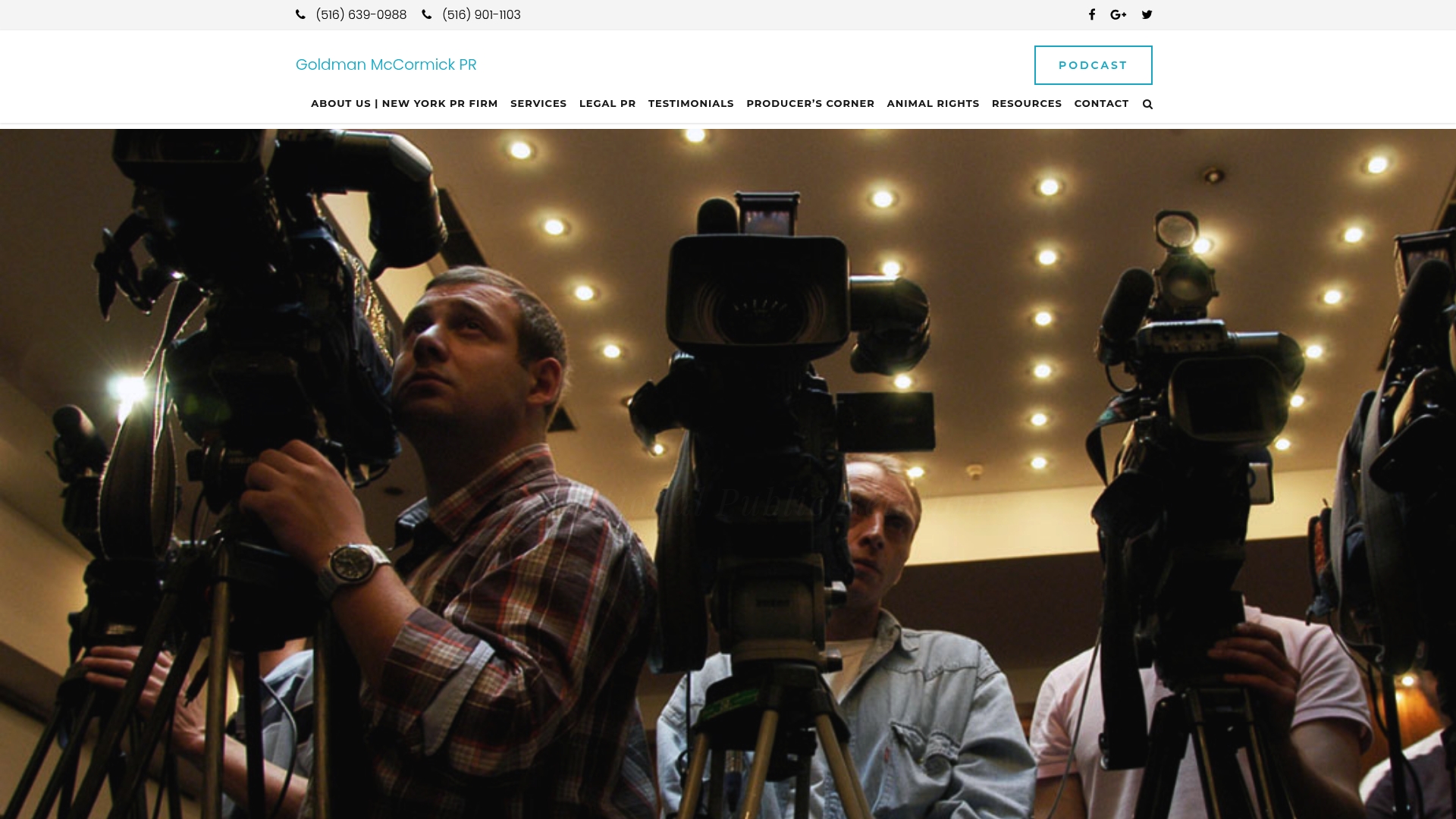
A typical media training session works through camera presence, on-message answers under pressure, and mock interviews that mirror what an actual broadcast or press conference feels like. That kind of feedback loop, from people who’ve produced hundreds of live segments, tends to sharpen a professional’s presence faster than months of unguided practice. If you have a TV appearance, deposition, or high-visibility panel coming up, consider scheduling a media training consultation to prepare and walk in already looking like you belong there.
Key Research and Practical Resources
The guidance above draws on a mix of controlled studies and practitioner observation, useful for anyone who wants to dig deeper on their own:
- Video-conferencing usage dynamics and nonverbal mechanisms exacerbate Zoom fatigue, Stanford’s study of nearly 10,000 video-call users.
- Facial expressions contribute more than body movements to conversational outcomes in avatar-mediated virtual environments, published in Scientific Reports.
- Mimicry and trust levels in video calls compared with face-to-face interactions, a comparative study of live video versus in-person rapport.
- Nonverbal behavior comparisons in video-mediated and face-to-face communication, on smile and voice compensation in virtual meetings.
- Effects of video resolution on nonverbal behavior in videoconferencing, on how camera quality and audio affect perceived engagement.
Sources
- Video-conferencing usage dynamics and nonverbal mechanisms exacerbate Zoom fatigue
- Facial expressions contribute more than body movements to conversational outcomes in avatar-mediated virtual environments
- Mimicry and trust levels in video calls compared with face-to-face interactions
FAQ
What Is On-Camera Personality?
On-camera personality is the combination of facial animation, vocal energy, eye contact, and gesture that makes a speaker feel present and relatable through a screen rather than flat or distant. It’s built, not innate. Deliberate habits like lens contact and slightly amplified expression, supported by research on virtual nonverbal cues, can develop it in most professionals within a few weeks of focused practice.
What Are the Main Types of Body Language to Watch For?
Nonverbal communication is typically grouped into categories such as facial expressions, eye contact, gestures, posture, proximity, touch, and vocal tone (sometimes called paralanguage). On camera, only a few of these fully transmit: facial expression, eye contact, gesture within frame, and vocal tone carry the most weight, since posture, proximity, and touch are largely lost in a small video window.
What Body Language Signals Suggest Someone Is Engaged?
Engagement on video usually shows up as a slight forward lean toward the camera, sustained (not staring) eye contact with the lens, nodding, and facial mirroring in response to what’s being said. Live video calls preserve much of this mimicry that would normally appear in face-to-face conversation, which is why mirrored expressions on a call are a genuine signal of connection rather than a lost gesture.
How Do I Stop Fidgeting on Video Calls?
Fidgeting usually comes from nervous energy that needs somewhere to go, so the fix is substitution rather than suppression. Rest your hands lightly on the desk edge, hold a pen, or plant your feet flat on the floor before the call starts, and do the five-minute warm-up routine to burn off tension beforehand.
Does Goldman McCormick PR Offer On-Camera Coaching?
Yes. Goldman McCormick PR’s media training service covers camera presence, message discipline, and live interview simulation for executives, attorneys, and other professionals preparing for TV, radio, or high-visibility appearances. Pricing is available on request through the firm’s site.